이전에 앨범을 연동할 때 UIImagePickerController를 사용했었는데
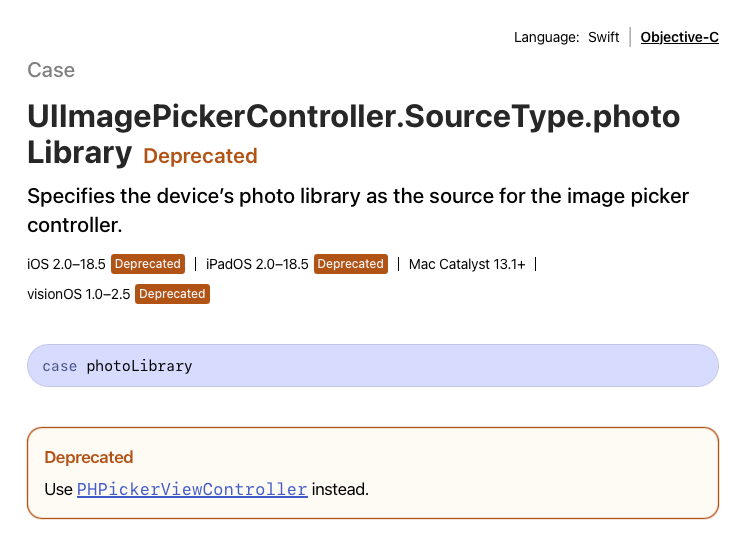
UIImagePickerController의 sourceType 중 앨범 연동 기능이 18.5 이후 Deprecated 된다는 소식을 접했다.
애플에서는 PHPickerController의 사용을 추천한다고 한다.
추가된 기능으로는 이미지 여러 장을 한 번에 선택할 수 있는 기능,
사용자가 허락한 미디어만 사용가능(보안 개선) 및 이미지를 안정적으로 처리한다고 합니다.
사용법
import PhotosUI
import PhotosUI
PHPickerConfiguration을 생성해 설정.
var configuration = PHPickerConfiguration()
configuration.selectionLimit = 5
configuration.filter = .images- selectionLimit: 선택할 수 있는 최대 값을 정해준다. 기본 값은 1이며, 제한이 없다면 0을 입력
- filter: 표시하는 타입을 제한한다. 기본 값은 nil이며, nil일 경우 모든 타입을 표시한다.
filter에 들어갈 수 있는 값은 아래 링크에 있다.
https://developer.apple.com/documentation/photosui/phpickerfilter-swift.struct
PHPickerFilter | Apple Developer Documentation
A type that defines the filter to apply to the photo library.
developer.apple.com
원래 images, LivePhotos, videos만 있는 줄 알고
.any(of: [.images, .livePhotos]) 만 해두고 실행해봤는데 전부 나오길래 별 생각 없었는데
찾아보니 iOS 15부터 screenshots 등 꽤 많은 타입들이 추가됐다.
그럼에도 스크린샷을 포함한 모든 이미지가 나오길래 뭐지 싶어서 찾아봤는데
대부분 초기에 나왔던 images, livePhotos, videos만 다루고 이후 정보가 별로 없어서 지피티에게 물어봤다.
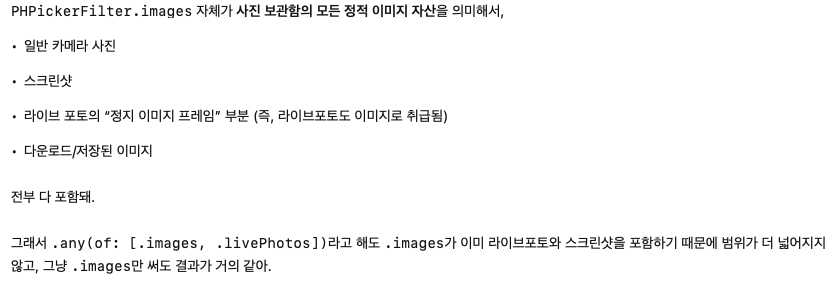
뭐 그렇다고 하는데 그러면 screenshots을 제외하고 싶다면
configuration.filter = .any(of: [.images, .not(.screenshots)])
// 인 줄 알았지만 .any는 "or(||)" 연산자라서 원하는 결과가 나오지 않는다고 한다

// "and(&&)" 연산자인 .all을 사용하면 된다!
configuration.filter = .all(of: [.images, .not(.screenshots)])
screentshots만 보여주고 싶다면
configuration.filter = .screenshots이런 방식으로 사용하면 된다.
PHPickerController 생성
let imagePicker = PHPickerViewController(configuration: configuration)
imagePicker.delegate = self

self.present(imagePicker, animated: true)
Delegate 채택
채택한 뒤 required method인 아래 메서드를 정의해줘야 한다.
extension AddNewContentViewController: PHPickerViewControllerDelegate {
    func picker(_ picker: PHPickerViewController, didFinishPicking results: [PHPickerResult]) {

    }
}
이미지 저장
func picker(_ picker: PHPickerViewController, didFinishPicking results: [PHPickerResult]) {
    // 우선 피커 디스미스
    picker.dismiss(animated: true)

    // 결과로 나온 값이 배열이기 때문에 forEach로 전부 돌려준다.
    // 한 장만 가져오도록 설정했다면 results.first?.itemProvider로 접근하면 된다.
    results.forEach { result in

        // itemProvider에서 UIImage로 로드 가능한지 조건문으로 체크
        if result.itemProvider.canLoadObject(ofClass: UIImage.self) {

            // 로드 핸들러를 통해 UIImage를 처리한다.
            result.itemProvider.loadObject(ofClass: UIImage.self) { [weak self] item, error in

                // 현재 item은 (any NSItemProviderReading)? 타입이기 때문에 타입캐스팅이 필요하다.
                guard let self, let image = item as? UIImage else { return }

                // 이후 필요한 곳에 넣어주면 된다.
                self.images.append(image)
            }
        }
    }
}
필자는 배열에 넣어줄 것이기 때문에 그대로 처리했지만
이미지를 한 장만 가져와 바로 UI에 적용할 것이라면 꼭 메인스레드를 명시해주고 사용해야 한다.
loadObject가 비동기로 처리되기 때문이라고 한다.
참고한 자료
iOS 14+ ) PHPicker
안녕하세요 :) Zedd입니다, WWDC를 보다가 정말정말..새로운것을 보게되어서 이렇게 공부하게 되었어요 :D 너무 재밌당 developer.apple.com/videos/play/wwdc2020/10652/ Meet the new Photos picker - WWDC 2020 - Videos - Appl
zeddios.tistory.com
[Swift/TIL #9] PHPickerViewController에 대하여
[TIL #9] 2023 / 04 / 03 ~ 2023 / 04 / 06 사진을 가져오려 하는데 iOS 14 이상부터는 UIImagePickerController 대신 PHPickerViewController를 사용하라고 하더라고요. 그래서 오늘은 PHPickerViewController에 대해서 알아보겠
ios-daniel-yang.tistory.com